100 Reels एक दिन में — हिसाब पहले, काम बाद में
रोज़ 100 Reels का मतलब है हर 14 मिनट में एक Reel — अगर आप 24 घंटे भी काम करें तो। इसलिए ये काम एक-एक Reel बनाकर नहीं होता, ये एक फैक्ट्री की तरह होता है: एक ही बार में कहानियाँ, एक ही बार में voiceover, एक ही बार में scenes — और फिर assembly line पर Reel दर Reel तैयार।
इस गाइड का पूरा हिसाब नीचे table में है — एक Reel में कितना time, कितने characters, कितने credits लगते हैं, और 100 Reels का दिन कैसा दिखता है।
| एक Reel का हिसाब | संख्या |
|---|---|
| Reel की लंबाई | 15–20 सेकंड (short format) |
| Script | लगभग 200 characters (30–35 शब्द) |
| Voiceover (ElevenLabs Turbo/Flash) | लगभग 100 credits (0.5 credit प्रति character) |
| Scenes | 3–4 AI scenes, हर scene 4–5 सेकंड |
| एक Reel बनाने का active time | 3–4 मिनट (batch में) |
| 100 Reels की voiceover | लगभग 20,000 characters |
ElevenLabs का free plan हर महीने 10,000 credits देता है। Turbo और Flash models पर 1 character का खर्च आधा credit होता है, इसलिए 10,000 credits से लगभग 20,000 characters की voiceover बनती है — यानी 100 short Reels की voiceover, हर Reel लगभग 200 characters की। यही वो maths है जिससे 100 Reels/day free plan पर feasible होता है — short Reels, Turbo model, और batch production।
वीडियो में क्या दिखाया गया है
ऊपर वाला reel @trywithmark का है — April 2026 में post हुआ, 36 सेकंड का। इसमें एक cartoon jungle story — “Leo the Explorer” — को example बनाकर पूरा faceless workflow दिखाया गया है: ChatGPT से कहानी, फिर हर scene का visual prompt, फिर AI video tool से scenes, फिर ElevenLabs से voiceover, और आखिर में video editor में सब कुछ जोड़कर Reel तैयार। इस गाइड में वही पूरा workflow step by step है — niche चुनने से लेकर posting routine तक।
https://www.instagram.com/reel/DXwnyETMuag/
पहले niche चुनिए — 100 Reels का fuel यहीं से आता है
Faceless channel की जान niche है। एक ही niche में 100 Reels बनाना आसान है, क्योंकि कहानी का format, character और style एक बार set हो जाए तो हर Reel में सिर्फ कहानी बदलती है। Reel में तीन niches बताए गए हैं — horror, cartoon और motivation — पर इनके अलावा भी कई niches इसी workflow पर चलते हैं।
| निच | क्यों चलता है | एक Reel का फॉर्मेट |
|---|---|---|
| Cartoon कहानियाँ | बच्चे और family audience, हर उम्र के viewers | एक छोटा character, एक छोटी adventure, एक moral |
| Horror कहानियाँ | रात में देखने वाला loyal audience | एक डरावनी जगह, एक twist, cliffhanger ending |
| Motivation | Share होने वाला content, हर दिन नया quote | एक struggle, एक turning point, एक line |
| जानवरों की कहानियाँ | बच्चों का सबसे पसंदीदा niche | दो जानवर दोस्त, एक मज़ेदार problem, happy ending |
| इतिहास और तथ्य | Curiosity — लोग अगली Reel का इंतज़ार करते हैं | एक रोचक तथ्य, एक कहानी, एक सवाल |
एक niche चुनिए और उसी में कम से कम 30 Reels बनाइए — उसके बाद ही पता चलता है कि audience को क्या पसंद आ रहा है। हर दिन niche बदलने से channel की पहचान नहीं बनती।
ChatGPT से कहानी — एक prompt, 10 कहानियाँ
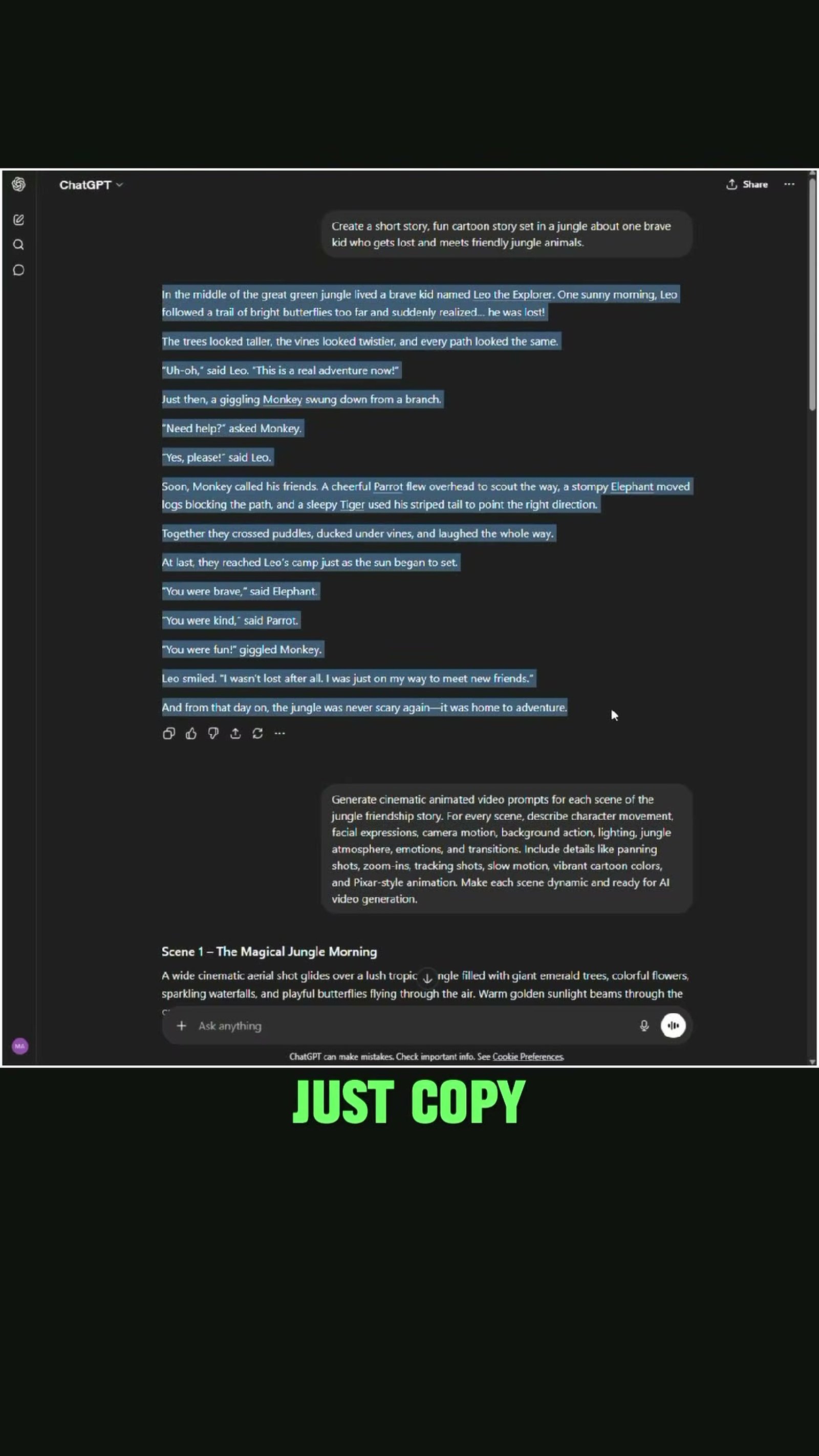
पहला step कहानी है। ChatGPT के free plan पर November 2026 में रोज़मर्रा की text chats unlimited हैं — GPT-5.6 Luna model पर, abuse safeguards के साथ। मतलब कहानियाँ लिखवाने के लिए free plan काफी है। Reel में जो कहानी दिखी है — “Leo the Explorer” — वो इसी तरह बनी थी: एक prompt, और ChatGPT ने पूरी कहानी scene by scene लिख दी।
ChatGPT को ये prompt दीजिए:
“Create a short story, fun cartoon story set in a jungle about one brave kid who gets lost and meets friendly jungle animals.”
और फिर हर कहानी को 4–5 scenes में बाँटने के लिए ये prompt:
“Generate cinematic animated video prompts for each scene of the jungle friendship story. For every scene, describe character movement, facial expressions, camera motion, background action, lighting, jungle atmosphere, emotions, and transitions. Include details like panning shots, zoom-ins, tracking shots, slow motion, vibrant cartoon colors, and Pixar-style animation. Make each scene dynamic and ready for AI video generation.”
एक ही chat में 10 कहानियाँ लिखवाइए — हर कहानी के लिए scene prompts भी उसी chat में माँग लीजिए। इससे character का नाम, look और style हर कहानी में एक जैसा रहता है, और audience को character से पहचान बन जाती है।
Scene prompts — जो prompt अच्छा, वो scene अच्छा
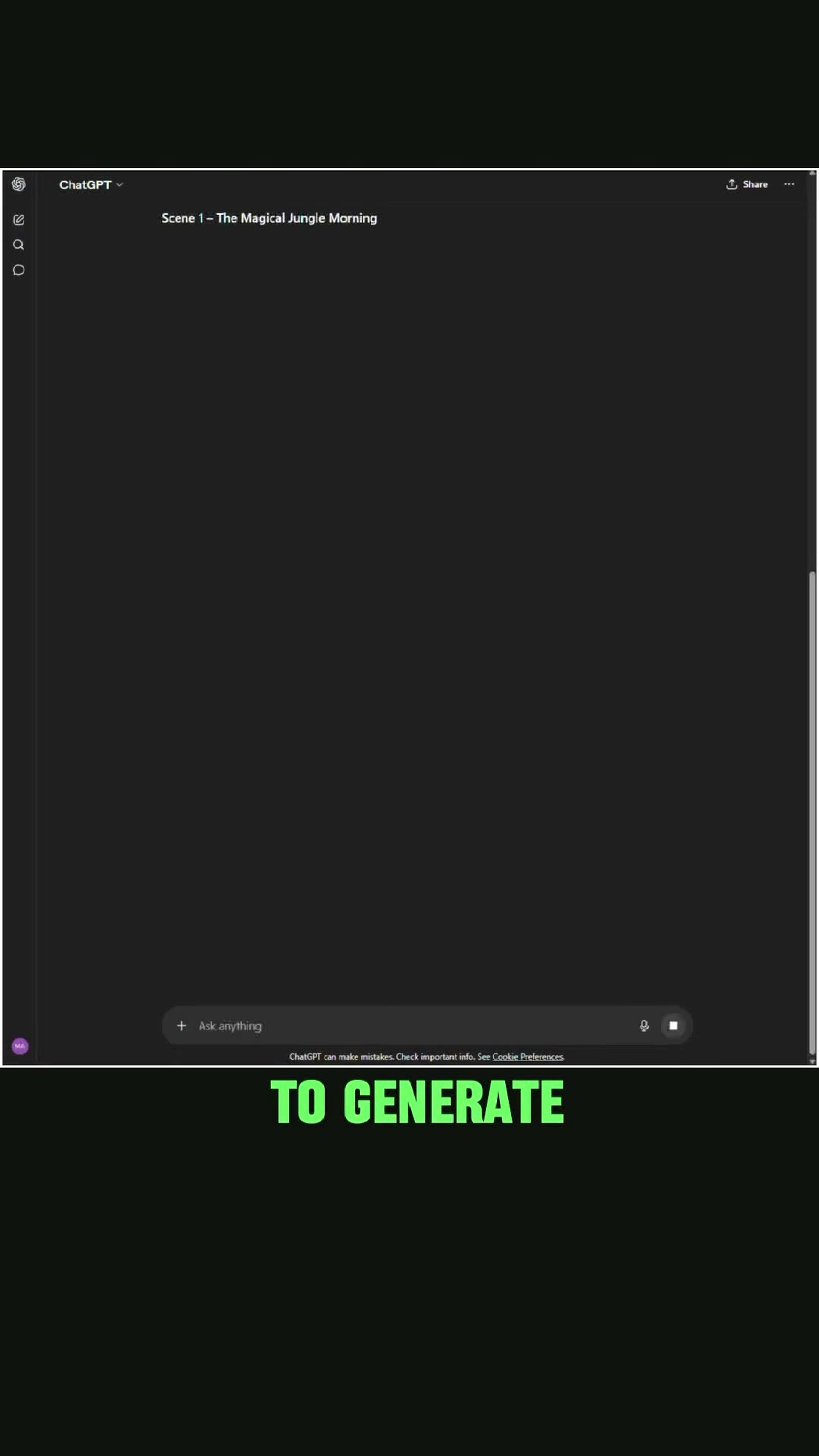
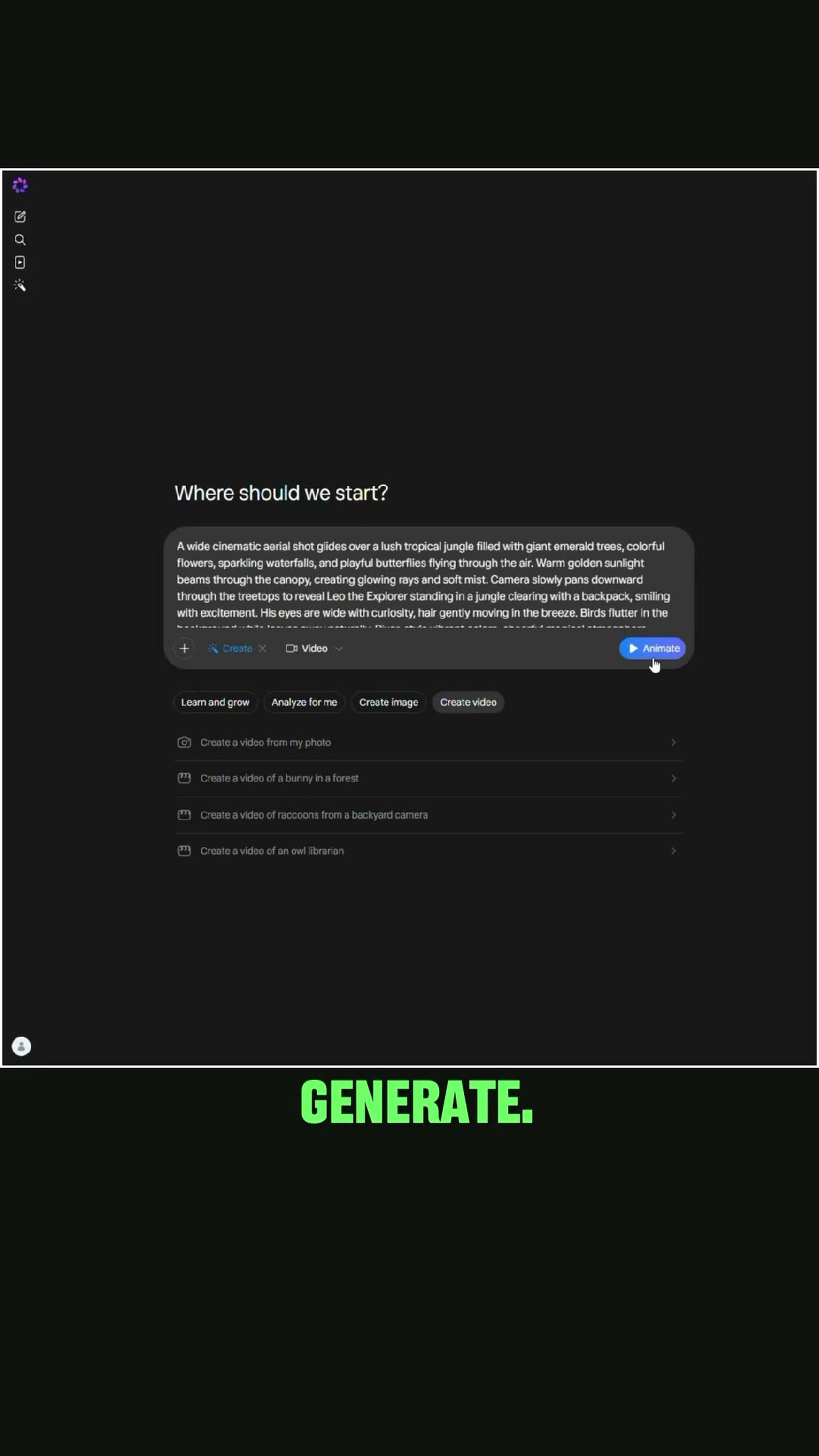
कहानी के बाद हर scene का visual prompt चाहिए। Reel में Scene 1 का prompt कुछ ऐसा था — “A wide cinematic aerial shot glides over a lush tropical jungle filled with giant emerald trees, colorful flowers, sparkling waterfalls, and playful butterflies flying through the air. Warm golden sunlight beams through the canopy, creating glowing rays and soft mist. Camera slowly pans downward through the treetops to reveal Leo the Explorer standing in a jungle clearing with a backpack, smiling with excitement.”
अच्छे scene prompt में ये पाँच चीज़ें होनी चाहिए:
| Prompt का हिस्सा | उदाहरण |
|---|---|
| Camera | Aerial shot, slow pan downward, zoom-in |
| जगह | Lush tropical jungle, waterfall, morning light |
| Character | Leo the Explorer, backpack, smiling with excitement |
| Action | Butterflies flying, birds fluttering, leaves moving |
| Style | Vibrant cartoon colors, Pixar-style animation, soft mist |
हर scene के लिए एक ही style line दोहराइए — “vibrant cartoon colors, Pixar-style animation” — ताकि सारी scenes एक ही दुनिया की लगें। Character का नाम और look हर prompt में same रखिए, वरना हर scene में character बदल जाएगा।
AI video tool से scenes — prompt डालिए, scenes चुनिए
अब scene prompts को AI video tool में डालिए। Reel में दिखाया गया tool prompt से कई scene options बनाता है — आप सबसे अच्छी वाली चुनकर download कर लीजिए, और यही process हर scene के लिए दोहराइए। एक Reel के लिए 3–4 scenes काफी हैं — हर scene 4–5 सेकंड का।
| सीन | लंबाई | क्या दिखता है |
|---|---|---|
| Scene 1 — Opening | 4–5 सेकंड | जगह और character का introduction |
| Scene 2 — Problem | 4–5 सेकंड | कहानी की problem — Leo खो गया |
| Scene 3 — Friends | 4–5 सेकंड | जानवर दोस्तों से मुलाकात |
| Scene 4 — Ending | 4–5 सेकंड | Happy ending, moral |
Scenes generate करते समय एक ही prompt के 3–4 options बनवाकर सबसे अच्छी वाली चुनिए — पहली generation हमेशा best नहीं होती। जो scenes reject हो जाएँ, उन्हें delete मत कीजिए — किसी और Reel में काम आ सकती हैं।
ElevenLabs से voiceover — आवाज़ ही आपकी पहचान है
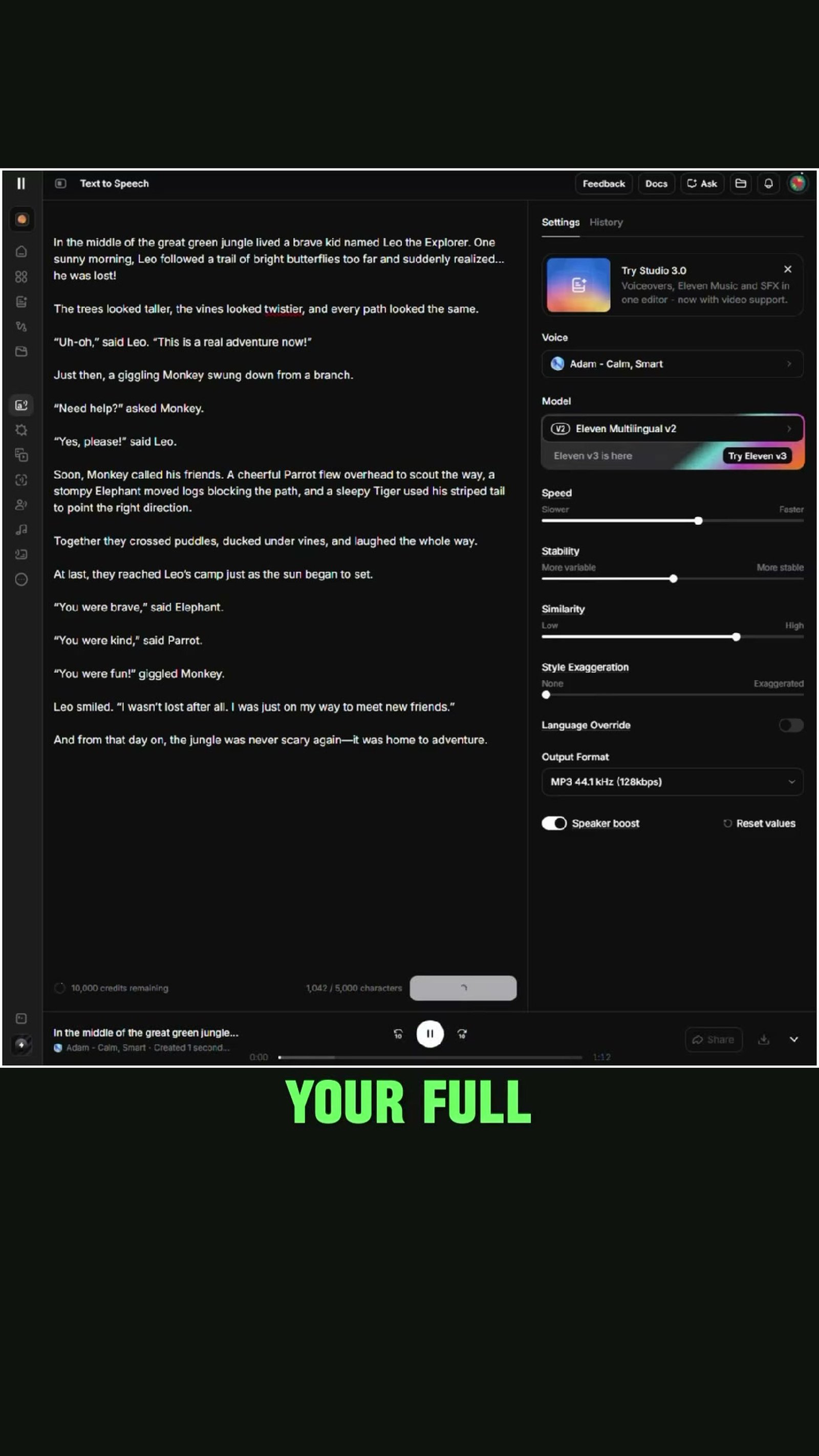
Faceless video में चेहरा नहीं होता, इसलिए आवाज़ ही channel की पहचान बनती है। Reel में voiceover ElevenLabs से बनाई गई है — कहानी का script copy करके paste किया, voice चुनी, generate दबाया, और पूरी audio सेकंडों में तैयार।
Reel में जो settings दिखी हैं, वो ये हैं — voice “Adam – Calm, Smart”, model “Eleven Multilingual v2”, output MP3 44.1kHz। Script लगभग 1,000 characters की थी, और ElevenLabs ने उसे लगभग 1 मिनट 12 सेकंड की audio में बदल दिया।
| ElevenLabs फ्री प्लान | विवरण |
|---|---|
| Credits | 10,000 credits हर महीने, rollover नहीं होता |
| Voiceover time | लगभग 10 मिनट (v3/v4 models) या 18–21 मिनट (Turbo/Flash models) |
| Cost | लगभग 1 credit प्रति character (Turbo/Flash पर आधा credit) |
| Voice cloning | Instant Voice Cloning free plan में भी मिलती है |
| Commercial use | Free plan पर commercial license नहीं मिलती — monetised videos के लिए Starter plan ($6/month, 30,000 credits) चाहिए |
| Attribution | Free plan पर attribution देना ज़रूरी है |
एक ही voice हर Reel में use कीजिए — audience को कुछ ही Reels में आपकी आवाज़ पहचानने लगेगी। Voice चुनते समय stability और similarity sliders को बीच में रखिए — stability ज़्यादा होने पर आवाज़ flat लगती है, कम होने पर हर line अलग लगती है।
सब कुछ जोड़िए — scenes, voiceover और captions
अब सब कुछ video editor में जोड़िए — CapCut या VN जैसे free editor में। Reel में यही आखिरी step दिखाया गया है: scenes और voiceover को combine करके Reel तैयार।
- Scenes को कहानी के order में timeline पर रखिए — हर scene 4–5 सेकंड।
- Voiceover को scenes के नीचे align कीजिए — जहाँ कहानी में scene बदलता है, वहाँ audio भी बदलनी चाहिए।
- Captions जोड़िए — बड़े, bold, screen के बीच में। ज़्यादातर लोग Reels बिना आवाज़ के देखते हैं, इसलिए captions ही कहानी सुनाते हैं।
- Background music हल्की रखिए — voiceover से धीमी, ताकि कहानी साफ़ सुनाई दे।
- 9:16 vertical format में export कीजिए — 1080×1920, MP4।
एक Reel की assembly में 3–4 मिनट लगते हैं, जब scenes और voiceover पहले से तैयार हों। इसलिए batch में काम कीजिए — पहले 10 कहानियाँ, फिर 10 voiceovers, फिर 10 assemblies। एक-एक Reel पूरी करने से 100 Reels कभी नहीं बनेंगी।
100 Reels/day का daily plan — batch में काम कीजिए
| समय | काम | नतीजा |
|---|---|---|
| सुबह 1 घंटा | ChatGPT से 10 कहानियाँ + scene prompts | 10 scripts तैयार |
| दोपहर 2 घंटे | AI video tool से scenes generate करें | 30–40 scenes |
| शाम 1 घंटा | ElevenLabs से 10 voiceovers | 10 audio files |
| रात 2 घंटे | Editor में assembly + captions + export | 10 Reels तैयार |
10 Reels प्रतिदिन की speed से भी 10 दिन में 100 Reels बन जाती हैं। 100 Reels एक ही दिन में बनाने के लिए यही blocks बड़े करने होते हैं — ज़्यादा कहानियाँ, ज़्यादा scenes, ज़्यादा voiceovers — पर order वही रहता है। Templates बचाइए: caption style, music, intro-outro — हर Reel में same रखिए, ताकि assembly में time बचे।
Posting routine — कब, कितनी, कैसे
Reels बनाना आधी बात है — posting routine दूसरी आधी। एक ही दिन में सारी Reels post मत कीजिए — उन्हें schedule कीजिए। Meta Business Suite से Reels schedule होती हैं — सुबह, दोपहर और रात, audience के active time पर।
| Posting का नियम | विवरण |
|---|---|
| एक दिन में | 3–5 Reels — ज़्यादा नहीं, ताकि हर Reel को reach मिलने का मौका मिले |
| Best time | सुबह 7–9, दोपहर 12–2, रात 7–10 — अपने audience के active hours check कीजिए |
| Caption | कहानी की एक line + niche के hashtags — 5–8 hashtags काफी हैं |
| पहले 3 सेकंड | Hook — सबसे interesting scene या line पहले रखिए |
| Series format | “Part 1”, “Part 2” — लोग अगली Reel देखने वापस आते हैं |
हर Reel के comments पढ़िए — लोग किस character को पसंद कर रहे हैं, कौन सी कहानी ज़्यादा देखी गई। अगली 10 कहानियाँ उसी feedback पर बनाइए।
ये गलतियाँ मत कीजिए
| गलती | क्यों नुकसान करती है | सही तरीका |
|---|---|---|
| हर Reel में नया character | Audience को पहचान नहीं बनती | एक ही character, 30 Reels तक |
| Voiceover हर बार अलग voice में | Channel की पहचान नहीं बनती | एक ही voice, हर Reel में |
| Scenes में style बदलना | Reels अलग-अलग दुनिया की लगती हैं | हर prompt में same style line |
| Captions नहीं डालना | बिना आवाज़ वाले viewers चले जाते हैं | बड़े bold captions, हर Reel में |
| एक ही दिन में 100 Reels post करना | Reach बँट जाती है, account spam जैसा लगता है | Schedule करके 3–5 प्रतिदिन |
अक्सर पूछे जाने वाले सवाल
Faceless AI video बनाने के लिए क्या-क्या चाहिए?
तीन चीज़ें — ChatGPT (कहानी और prompts), एक AI video tool (scenes), और ElevenLabs (voiceover) — और एक free video editor assembly के लिए। कैमरा, mic या चेहरा कुछ नहीं चाहिए।
ElevenLabs free plan से कितनी voiceover बनती है?
10,000 credits हर महीने। Turbo/Flash models पर 1 character का खर्च आधा credit है, इसलिए लगभग 20,000 characters की voiceover — यानी 100 short Reels (हर Reel लगभग 200 characters)।
ChatGPT free plan पर कितनी कहानियाँ लिखवा सकते हैं?
November 2026 में ChatGPT free plan पर रोज़मर्रा की text chats unlimited हैं — GPT-5.6 Luna model पर। कहानियाँ और scene prompts लिखवाने के लिए free plan काफी है।
100 Reels एक दिन में सच में बन सकती हैं?
Batch production से हाँ — एक साथ कहानियाँ, एक साथ voiceovers, एक साथ scenes, फिर assembly line। एक-एक Reel बनाकर नहीं, factory style में। Short Reels (15–20 सेकंड) रखिए और templates use कीजिए।
कौन सा niche सबसे अच्छा है?
Cartoon कहानियाँ, horror, motivation और जानवरों की कहानियाँ — ये चारों इसी workflow पर चलते हैं। एक niche चुनकर उसी में 30 Reels बनाइए, फिर data देखकर decide कीजिए।
AI video के लिए scenes free में कहाँ से बनती हैं?
Reel में दिखाए गए prompt-से-video workflow वाले tools के अलावा Kling, Hailuo और Luma जैसे tools के free tier/credits से भी scenes बनती हैं। हर tool के free credits limited होते हैं, इसलिए scenes पहले से plan करके generate कीजिए।
अंत में
Faceless AI video का पूरा game consistency है — एक niche, एक character, एक voice, और हर दिन Reels। ChatGPT कहानी लिखता है, AI video tool scenes बनाता है, ElevenLabs आवाज़ देता है, और editor में सब कुछ जुड़कर Reel बन जाती है। आज पहली कहानी लिखिए — 10 कहानियों के बाद workflow हाथ में आ जाएगा, और 100 Reels का target सिर्फ maths रह जाएगा।